Camera Capers

Unlock Your Creativity: Powerful Free Photo Editing Software Alternatives to Photoshop
For years, Adobe Photoshop has stood as the undisputed titan in the world of professional photo editing. Its comprehensive suite of tools offers unparalleled capabilities for designers, photographers, and artists alike. However, the premium price tag and steep learning curve can be significant barriers for many, especially hobbyists, bloggers, small business owners, or anyone simply looking to enhance their personal photos without a hefty investment. The good news is that the digital landscape has evolved, bringing forth a new generation of incredibly capable and, most importantly, completely free alternatives that can help you achieve stunning results.
This article delves into two exceptional free options that prove you don’t need to break the bank to master your images. Whether you’re seeking robust desktop software for intricate adjustments or an easy-to-use online platform for artistic transformations, we’ve got you covered. Prepare to discover how these tools can empower your visual storytelling and elevate your digital creations, all without spending a single penny.
Paint.NET: Your Go-To for Core Photo Editing Excellence
When it comes to free desktop-based photo editing software, Paint.NET consistently emerges as a top contender. Far more advanced than its namesake (Microsoft Paint), Paint.NET offers a surprisingly robust set of features that cover the essentials of image manipulation, making it an ideal choice for anyone needing reliable software without the prohibitive cost or complexity of professional suites. It strikes a perfect balance between ease of use and powerful functionality, positioning itself as an excellent Photoshop alternative for everyday tasks.
One of Paint.NET’s most significant advantages is its intuitive, user-friendly interface. Designed with simplicity in mind, it allows even beginners to quickly grasp its core functions. Yet, beneath its approachable exterior lies sophisticated capabilities, including support for layers, which is a cornerstone of non-destructive editing. This feature alone significantly broadens your creative possibilities, allowing you to compose complex images, make precise adjustments, and experiment with various elements without permanently altering your original photographs.
I’ve personally relied on Paint.NET extensively for a wide array of tasks on this very blog. From crafting custom headers and interactive buttons to meticulously modifying and enhancing every single photo, it has proven to be an indispensable tool. Its efficiency in handling basic operations like cropping, resizing, rotating, and color correction makes it incredibly fast for preparing images for web use or print. Furthermore, its vibrant community has contributed a plethora of free plugins, extending its functionality even further to include special effects, advanced selection tools, and more, rivaling some paid software features.
If your primary needs revolve around fundamental photo enhancements, graphic design for web content, or even light digital painting, Paint.NET provides a comprehensive and highly effective solution. It runs smoothly on Windows operating systems and offers a stable environment for all your essential image editing projects, making it a powerful foundation for anyone looking to step up their photo game without the financial strain.
BeFunky: Unleash Your Artistic Side Online, No Download Required
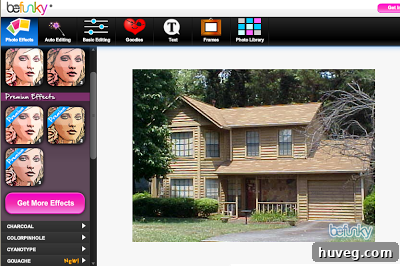
Perhaps downloading and installing new software isn’t an option for you, or maybe you simply prefer the convenience of an online editor. Whatever your reason, there’s a fantastic web-based solution that caters to your creative impulses: BeFunky. This innovative platform stands out by offering a delightful array of photo effects and editing tools directly in your browser, eliminating the need for any pesky downloads or installations. It’s the perfect choice for quick edits, artistic transformations, and creating unique visuals on the fly, whether you’re at home, work, or on the go.
BeFunky’s appeal lies in its straightforward workflow. All you need to do is upload your photo directly from your computer, or even from popular cloud services or social media platforms. Once uploaded, you’re presented with an intuitive interface filled with a plethora of effects, filters, and editing options. You can apply artistic styles, enhance colors, add text, create collages, and much more. After you’ve made your desired modifications, simply export the photo back to your computer. It’s an incredibly efficient process, ideal for those who value speed and accessibility in their creative endeavors.
One aspect to consider with BeFunky’s free version is the subtle watermark that typically appears on the bottom right of your processed images. While some might find this a minor inconvenience, it’s often easily manageable. For many projects, the watermark might be acceptable, but if you require a completely clean image, a simple cropping tool (which BeFunky itself often includes, or any basic image viewer on your computer) can remove it in seconds. This small step is a small price to pay for the extensive creative freedom you gain.
To truly illustrate BeFunky’s transformative power, let’s explore some captivating examples. I took a standard photograph of my house, a straightforward image, and put BeFunky’s artistic filters to the test. The results were nothing short of astonishing, demonstrating how a mundane photo can be transformed into a piece of digital art with just a few clicks.

This is the original photograph of my house, simple and unadorned, serving as the perfect canvas for BeFunky’s artistic filters.
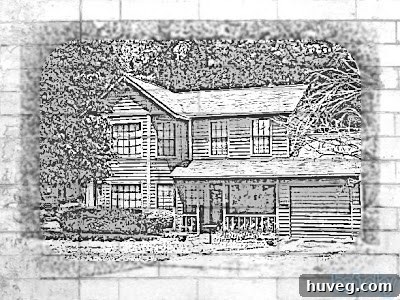
First, I applied a pencil sketch effect, which meticulously transformed the photo into a detailed drawing. The algorithm artfully interpreted the contours and shadows, creating an impressionistic yet recognizable rendition that evokes the charm of hand-drawn artwork.
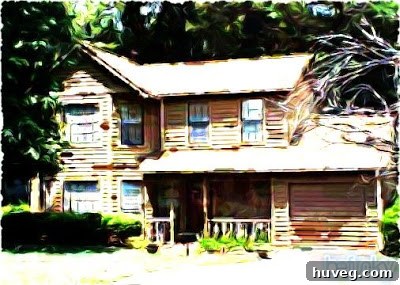
Next, I experimented with the “Gouache” filter. This effect reimagined the house as if painted with thick, opaque watercolors, characterized by bold brushstrokes and vibrant, saturated colors. The texture and artistic interpretation gave the image a completely different, almost painterly, aesthetic.

Finally, to demonstrate its versatility, I applied an aging effect. This filter gave the photo a nostalgic, vintage look, complete with sepia tones, simulated fading, and subtle imperfections, making the modern house appear as if it had been captured decades ago.
These examples merely scratch the surface of what’s possible with BeFunky. The platform is a treasure trove for anyone looking to inject personality and unique flair into their images. Imagine creating personalized greeting cards, designing eye-catching social media posts, or even developing unique artwork for your home decor. The possibilities are truly endless when you can effortlessly turn any photograph into a stunning piece of creative expression.
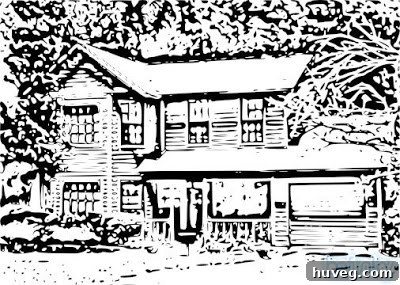
Taking inspiration from these artistic transformations, I’m already planning to leverage one of these creatively enhanced house photos to design our personalized holiday Christmas cards this year. It’s a wonderful way to add a unique, handmade touch that stands out from generic store-bought options.
Beyond the Basics: Elevating Your Visual Content with Free Tools
The availability of powerful, free photo editing software like Paint.NET and BeFunky signifies a democratization of creativity. No longer are sophisticated image manipulation techniques confined to expensive professional studios. Bloggers can create stunning featured images, small businesses can design compelling marketing materials, and individuals can craft personalized gifts or decorate their digital spaces with unique visual content, all on a budget. These tools empower you to tell your story more effectively, engage your audience, and express your individuality without the barrier of cost or complex software.
Tips for Maximizing Your Free Photo Editors:
- Experiment Fearlessly: Don’t be afraid to try every filter, tool, and adjustment. The beauty of digital editing is that you can always revert to the original. Experimentation is key to discovering new styles and effects.
- Learn the Basics of Composition: Even with powerful tools, a strong foundation in photography principles like the rule of thirds, leading lines, and negative space will dramatically improve your results.
- Utilize Layers (Paint.NET): If using Paint.NET, get comfortable with layers. They are fundamental for complex edits, combining elements, and making non-destructive changes.
- Understand File Formats: Know when to use JPEG (for photos), PNG (for transparent backgrounds or sharp graphics), and GIF (for simple animations). This ensures optimal quality and file size for your specific needs.
- Backup Your Originals: Always keep a copy of your original, unedited photos. This safeguards against accidental deletions or if you decide to go in a different creative direction later.
- Seek Inspiration: Look at how others use photo effects and editing tools. Pinterest, Instagram, and design blogs are excellent sources of inspiration for new ideas and techniques.
By investing a little time in learning these free platforms, you unlock a world of possibilities for your visual content. They offer robust features for enhancing, correcting, and creatively transforming your images, proving that you don’t need a high-priced subscription to achieve professional-looking results. Whether you’re a budding artist, a dedicated blogger, or simply someone who loves playing with photos, these alternatives provide the tools you need to bring your creative visions to life.
Join the Conversation: Your Favorite Photo Editing Hacks
Now, we turn the conversation over to you! Do you have any other fantastic free sites or downloadable software that you adore for photo effects and editing? Perhaps you’re a devoted “Photoshop Phanatic” and have insights into its professional advantages. We’d love to hear your recommendations and experiences. If you choose to share a link in the comments below, please remember to specify whether your suggested site or software is downloadable, entirely free, offers a free tier with limitations, or is a paid service. Your contributions help our community discover even more incredible resources for digital creativity!