Quick Jigsaw Blade Swap

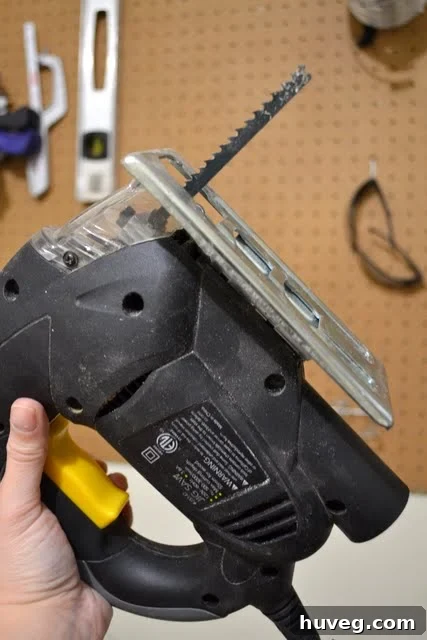
How to Easily Change a Jigsaw Blade: A Comprehensive Guide
Every DIY enthusiast, crafter, or professional woodworker eventually faces the same common challenge: a dull jigsaw blade. A sharp blade is paramount not only for achieving clean, precise cuts but also for ensuring your safety and the longevity of your tool. Recently, I found myself in this exact predicament; my jigsaw was ready for a new project, but its blade had definitely seen better days. The thought of changing it for the first time brought a flurry of questions: Is it a complex task? Are there different blade types to consider? Most importantly, could I successfully replace it without any mishaps?
As it turns out, replacing a jigsaw blade is far simpler than many imagine. This comprehensive guide aims to demystify the process, making it accessible even for those new to power tools. While jigsaw models may vary slightly in their design and blade changing mechanisms, the fundamental steps remain consistent. This tutorial is based on a common jigsaw design, but it’s always a good practice to consult your specific jigsaw’s user manual for model-specific instructions. Before we delve into the step-by-step process, let’s emphasize the golden rule of working with any power tool: safety first! Always ensure your jigsaw is unplugged from the wall outlet before you attempt any maintenance, adjustments, or blade changes.
Why a Sharp Jigsaw Blade Is Non-Negotiable
The condition of your jigsaw blade directly impacts the quality of your work, your efficiency, and most critically, your safety. Understanding why a sharp blade is essential will motivate you to change it regularly:
- Superior Cut Quality: A sharp blade glides effortlessly through materials, producing clean, smooth, and precise cuts with minimal tear-out or splintering. A dull blade, on the other hand, struggles, leading to ragged edges, uneven cuts, and a frustrated operator.
- Enhanced Efficiency and Speed: When your blade is sharp, the saw does the work. You’ll experience less resistance, enabling faster cutting times and requiring less force to push the saw. This reduces both physical fatigue for you and strain on the jigsaw’s motor.
- Significantly Improved Safety: This is arguably the most crucial point. A dull blade forces you to exert more pressure, which increases the risk of kickback, the blade binding, slipping, or losing control of the tool entirely. A sharp blade cuts with less effort, making the jigsaw more predictable and safer to handle.
- Increased Tool Longevity: Forcing a dull blade through material puts undue stress on the jigsaw’s motor, gears, and blade clamp mechanism. Regularly replacing dull blades helps preserve your tool’s internal components, extending its operational life.
Essential Safety Precautions Before Starting
Working with power tools requires a disciplined approach to safety. Before you even touch your jigsaw for a blade change, please adhere to these vital precautions:
- Always Unplug Your Jigsaw: This is the most critical step. Disconnecting the power source eliminates any risk of accidental startup while your hands are near the blade.
- Wear Appropriate Personal Protective Equipment (PPE): Safety glasses are mandatory to protect your eyes from potential debris or the old blade snapping. Consider wearing work gloves to shield your hands from the sharp teeth of new and old blades.
- Ensure Adequate Lighting: Perform the blade change in a well-lit area so you can clearly see the blade, its clamp, and any fasteners. Good visibility prevents fumbling and potential accidents.
- Secure Your Workspace: Use a stable workbench or a flat, sturdy surface where your jigsaw can rest securely without the risk of tipping or sliding during the process.
- Consult Your Jigsaw’s User Manual: If you still have it, refer to your jigsaw’s specific manual. It will provide model-specific instructions, diagrams, and additional safety warnings unique to your tool.
1. Understand Your Jigsaw’s Basic Components
Before you begin any disassembly, take a moment to identify the key parts of your jigsaw relevant to blade replacement. Beyond the obvious motor housing and handle, focus on the lower section of the tool. You’ll typically find the base plate (or shoe), which rests on the material being cut, and directly above it, the crucial blade clamping mechanism that secures the blade. Most jigsaws also feature a blade guide roller, a small wheel or bearing behind the blade that provides support and prevents deflection during cutting.
The “thingie” (as it was affectionately called in the original text) that holds the blade is officially known as the blade clamp or blade holder. This mechanism is what you’ll primarily interact with. Depending on your jigsaw’s brand, model, and age, this clamp will either be secured by one or two screws (often requiring an Allen wrench or a screwdriver) or utilize a modern, tool-less quick-release lever or button. Modern designs prioritize ease of use, allowing for rapid blade swaps.
Additionally, you may encounter a blade guard or shield, a protective cover designed to prevent fingers or debris from contacting the moving blade. This guard might need to be partially moved or temporarily removed to access the blade clamp. Familiarizing yourself with these components will make the blade changing process much smoother.
2. Accessing the Blade: Focus on Necessary Disassembly Only
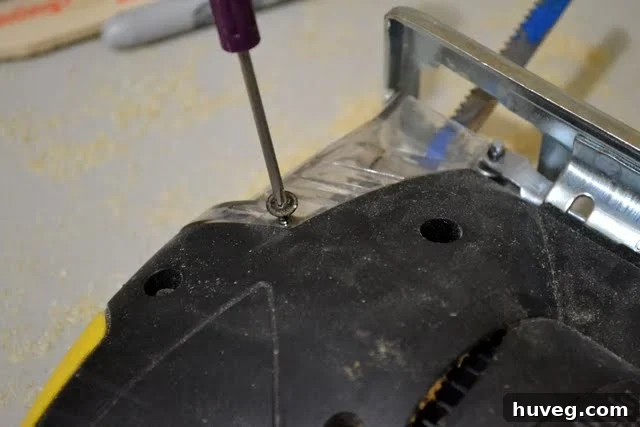
With a clear understanding of your jigsaw’s components, your next step is to gain unobstructed access to the blade clamping mechanism. This often involves moving or removing any blade guards or protective covers that sit in front of the blade. These guards are typically held in place by small screws that can be easily unscrewed with a standard screwdriver. Carefully remove them and set the screws aside in a safe place to prevent loss.
A crucial piece of advice, learned from personal experience, is to resist the temptation to remove any parts that are not directly obstructing access to the blade clamp. I once attempted to remove the entire base plate of my jigsaw, thinking it would provide better leverage for a stubborn blade screw. What I encountered was an assembly constructed of multiple small pieces, which promptly scattered across my garage floor. This led to an unnecessary delay and a frustrating search for lost components. The lesson is clear: only remove what is absolutely essential to reach and operate the blade clamp. In most cases, this means only the blade guard and, if applicable, loosening the specific screws on the blade clamp itself. If your jigsaw requires an Allen wrench, ensure you have the correct size; many jigsaws come with a dedicated wrench stored on the tool itself, often near the power cord or on the base plate.
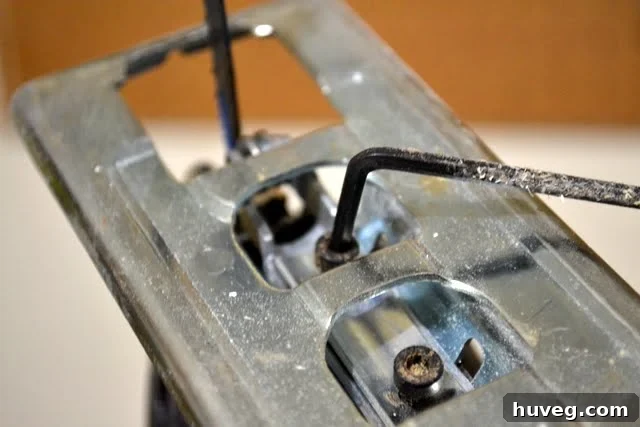
3. Releasing the Old, Worn-Out Blade
With the blade clamp now fully accessible, it’s time to remove the old blade. If your jigsaw features a modern, tool-less quick-release system, simply engage the lever or push the button to open the clamp jaws. The blade should then drop out or be easily pulled downwards. For jigsaws that use screws to secure the blade, utilize your Allen wrench or screwdriver to loosen these fasteners. You typically don’t need to remove the screws entirely; just loosen them enough so that the blade can slide freely out of its slot.
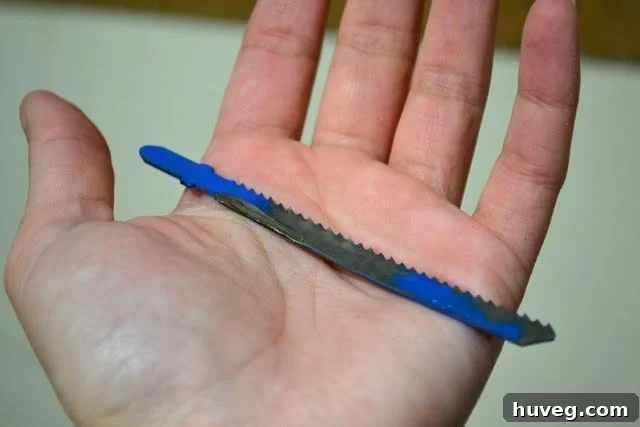
Once loosened, carefully slide the old blade downwards and out of the clamp. Exercise extreme caution during this step, as even a dull blade can still possess sharp edges, particularly its teeth, which can cause cuts. Once removed, take a moment to inspect the old blade. You’ll likely observe clear signs of wear, such as blunted, rounded, or even broken teeth, as well as potential bends or warping. These indicators confirm that the blade was indeed past its prime and needed replacement. To dispose of old blades safely, it’s recommended to wrap them in thick tape, cardboard, or place them in a rigid container before discarding them, preventing accidental injury to waste handlers.
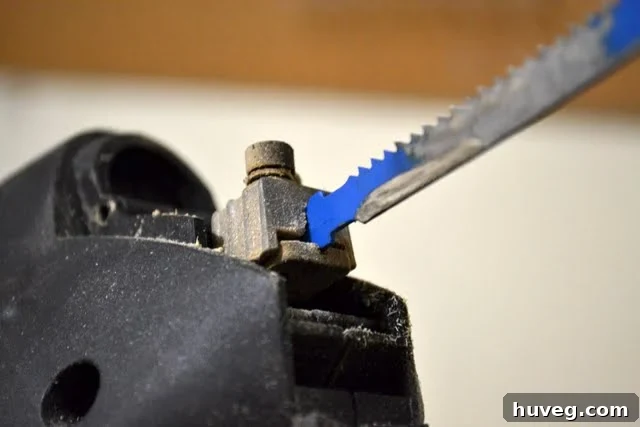
As evident from its condition, the old blade was clearly due for replacement.
4. Choosing the Right Jigsaw Blade: Shanks, Materials, and Beyond
Now that the old blade is removed, you’re at a critical juncture: selecting the perfect new blade. The world of jigsaw blades is vast, with options designed for every material and cut type imaginable. Making an informed choice will significantly impact the quality and efficiency of your work.
Understanding Blade Shank Types:
The first and most important consideration is the blade’s shank type – the part that fits into your jigsaw’s clamp. There are two primary types:
- T-Shank Blades: These are the modern standard and increasingly prevalent, especially in newer jigsaws with tool-less blade change systems. T-shank blades feature a distinctive ‘T’ shape at the top of the shank, which simply slides into the blade clamp and locks securely into place without the need for additional tools. This design makes blade changes incredibly fast and convenient.
- U-Shank Blades: Historically, U-shank blades were more common, particularly in older or more budget-friendly jigsaw models. They have a ‘U’-shaped notch at the top of the shank and typically require a set screw, tightened with an Allen wrench or screwdriver, to hold them in the clamp. While effective, they are less convenient to change compared to T-shanks.
- Universal Shank Blades: Some manufacturers offer “universal shank” blades, which are designed with a profile that attempts to be compatible with both T-shank and U-shank jigsaws. While these can offer versatility, it’s always wise to confirm compatibility with your specific tool before purchase.
Expert Tip for Identification: The easiest and most reliable way to determine which shank type your jigsaw requires is to examine your old blade. Take it with you to the hardware store to find a visual match. Alternatively, consult your jigsaw’s owner’s manual or look for identifying marks on the blade clamp itself. My own experience included an unnecessary trip back to the store after incorrectly guessing my jigsaw’s shank type; avoid this by verifying beforehand!
Delving Deeper: Blade Material and Tooth Configuration
Beyond the shank, the blade’s material and tooth characteristics dictate its suitability for various applications:
Blade Material:
- High Carbon Steel (HCS): These flexible and economical blades are best suited for cutting softer materials such as wood, plywood, particleboard, and plastics. They tend to dull quickly on harder materials.
- High Speed Steel (HSS): HSS blades are more heat-resistant and durable than HCS, making them ideal for cutting harder materials like non-ferrous metals (aluminum, copper), thin sheet metal, and tough plastics.
- Bi-Metal (BIM): Bi-metal blades combine the flexibility of an HCS body with the durable cutting edge of HSS teeth. This combination results in excellent all-around blades with a significantly longer lifespan, capable of cutting wood (even with nails), various metals, and plastics. They are a great choice for general-purpose use.
- Carbide-Tipped (CT): For the most demanding materials, carbide-tipped blades are the answer. They are exceptionally durable and designed to cut abrasive materials such as ceramics, fiberglass, stainless steel, cast iron, and cement board. They are typically the most expensive option.
Tooth Configuration (Teeth Per Inch – TPI):
The number of teeth per inch (TPI) fundamentally determines the speed and smoothness of your cut:
- Low TPI (6-10 TPI): Blades with fewer, larger teeth cut very fast but produce a coarser, rougher finish. They are best for thick wood, framing, and demolition work where speed is prioritized over finish quality.
- Medium TPI (10-14 TPI): A versatile choice for general woodworking, offering a balance between cutting speed and a reasonably smooth finish on wood, plywood, and certain plastics.
- High TPI (14-24+ TPI): Blades with many small teeth create very fine, clean cuts. These are essential for cutting metals, delicate plastics, laminates, and achieving a splinter-free finish on veneers or countertops.
Other tooth characteristics include the “tooth set” (how the teeth are angled) – for example, wavy set for fine metal cutting, taper ground for splinter-free wood, or side set for fast wood cuts. Blade length and width are also considerations: longer blades are for thicker materials, while narrower blades excel at intricate curved cuts (scrollwork) compared to wider blades which offer more stability for straight lines.
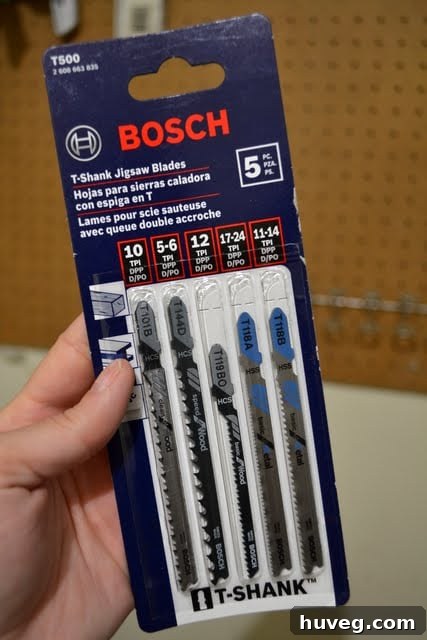
If you tackle a variety of projects, consider purchasing a multi-pack of jigsaw blades. These typically include a selection of different shank types, materials, and TPI counts, providing versatility for various tasks.
5. Inserting the New Blade and Securing It Firmly
With the correct new blade in hand, you’re ready for installation. Before inserting, ensure the blade is oriented correctly: the teeth should generally face forward, towards the front of the saw’s base plate, in the direction of the cut. While specialized reverse-tooth blades exist (which cut on the downstroke for a cleaner top surface), for most standard applications, the teeth will point forward.
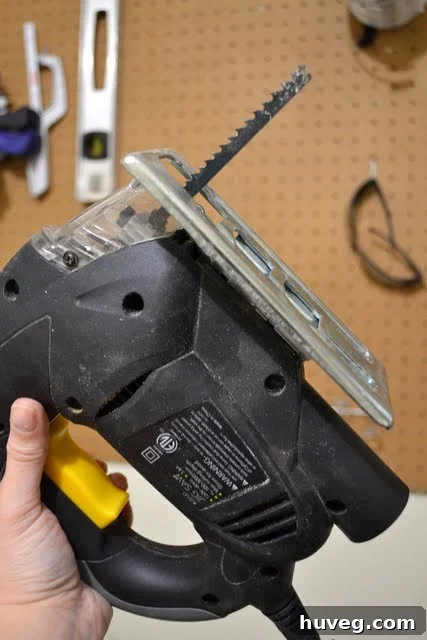
Carefully slide the shank of the new blade into the jigsaw’s blade clamp. Push it upwards as far as it will go, ensuring it seats firmly and aligns properly within any guide rollers. If your jigsaw has a tool-less quick-release mechanism, simply release the lever or button, and the blade should lock securely into place. Give it a gentle tug to confirm it’s engaged. For jigsaws with screw-tightened clamps, use your Allen wrench or screwdriver to firmly tighten the screws. It’s crucial that the blade is held securely without any wobble or play. However, avoid overtightening, which could strip the screws or damage the blade holder. If the blade doesn’t fit or seems difficult to insert, double-check that you have the correct shank type for your jigsaw; never force a blade into the clamp.
6. Reassemble Your Jigsaw and Conduct a Test Run
Once the new blade is perfectly seated and securely tightened, carefully reassemble any guards or covers that you removed earlier. Ensure all screws are properly tightened, and confirm that no tools or loose components are left on or near the saw’s moving parts. Your goal is to return the jigsaw to its fully functional and safe state.
With the jigsaw reassembled, you can now plug it back into the power outlet. Before you make your first cut on your actual project material, it’s highly recommended to perform a brief test run. Turn on the jigsaw and allow it to run at an idle speed for a few seconds. Observe the blade’s movement: it should run smoothly, without excessive vibration, wobble, or unusual noises. If everything appears and sounds correct, grab a piece of scrap material – ideally, something similar to what you’ll be cutting for your project. Make a test cut to verify that the blade is cutting cleanly, efficiently, and precisely. This final check ensures that your blade is installed correctly and ready for action.
Troubleshooting Common Jigsaw Blade Issues
Even with careful installation, you might occasionally encounter minor issues. Here are some common problems and their quick fixes:
- Blade Keeps Falling Out: The most frequent cause is that the blade clamp screws were not tightened sufficiently, or you are using the wrong shank type for your jigsaw. Ensure the blade is fully inserted and the clamp is firmly secured.
- Blade Bending or Breaking Easily: This often suggests that you are using the wrong type of blade for the material (e.g., HCS on metal), pushing the saw too hard, or operating at an incorrect speed. A dull blade is also far more susceptible to bending and breaking.
- Rough or Splintered Cuts: A dull blade is the primary culprit. It could also mean you’re using a blade with too few teeth per inch (TPI) for the material, or you’re moving the saw too quickly through the workpiece.
- Excessive Saw Vibration: Check if the blade is correctly seated and tightened in the clamp. Also, inspect the blade itself for any signs of bending or damage.
Maintaining Your Jigsaw for Optimal Performance
Beyond simply changing blades, consistent maintenance can significantly extend the life and enhance the performance of your jigsaw:
- Regular Cleaning: Sawdust and debris can accumulate in the blade area, ventilation slots, and around the motor. Use compressed air or a soft brush to clear these out after each use to prevent overheating and mechanical issues.
- Inspect the Base Plate: Keep the base plate clean and free of burrs or scratches, which could mar your workpiece.
- Proper Blade Storage: Store new and used blades in their original protective cases or a dedicated blade holder to prevent damage to the teeth and protect against rust and corrosion.
- Avoid Forcing the Cut: Let the blade and the motor do the work. Forcing the saw can lead to premature blade dulling, motor overheating, and increased risk of kickback.
- Check the Power Cord: Periodically inspect the power cord for any signs of cuts, fraying, or exposed wires. Replace damaged cords immediately.
While changing a jigsaw blade might initially appear to be a challenging task, as you’ve now learned, it’s a straightforward and quick process that profoundly impacts your tool’s efficiency, performance, and most importantly, your safety. By confidently understanding your jigsaw’s components, selecting the appropriate blade for your project, and meticulously following these step-by-step instructions, you’ll feel empowered to tackle a much broader array of DIY and woodworking endeavors. Happy cutting, and enjoy your beautifully finished projects!
NEW: You can now browse projects by tool in my Project Gallery! See ones involving a jigsaw here.