Doorbell Appreciation Plaque

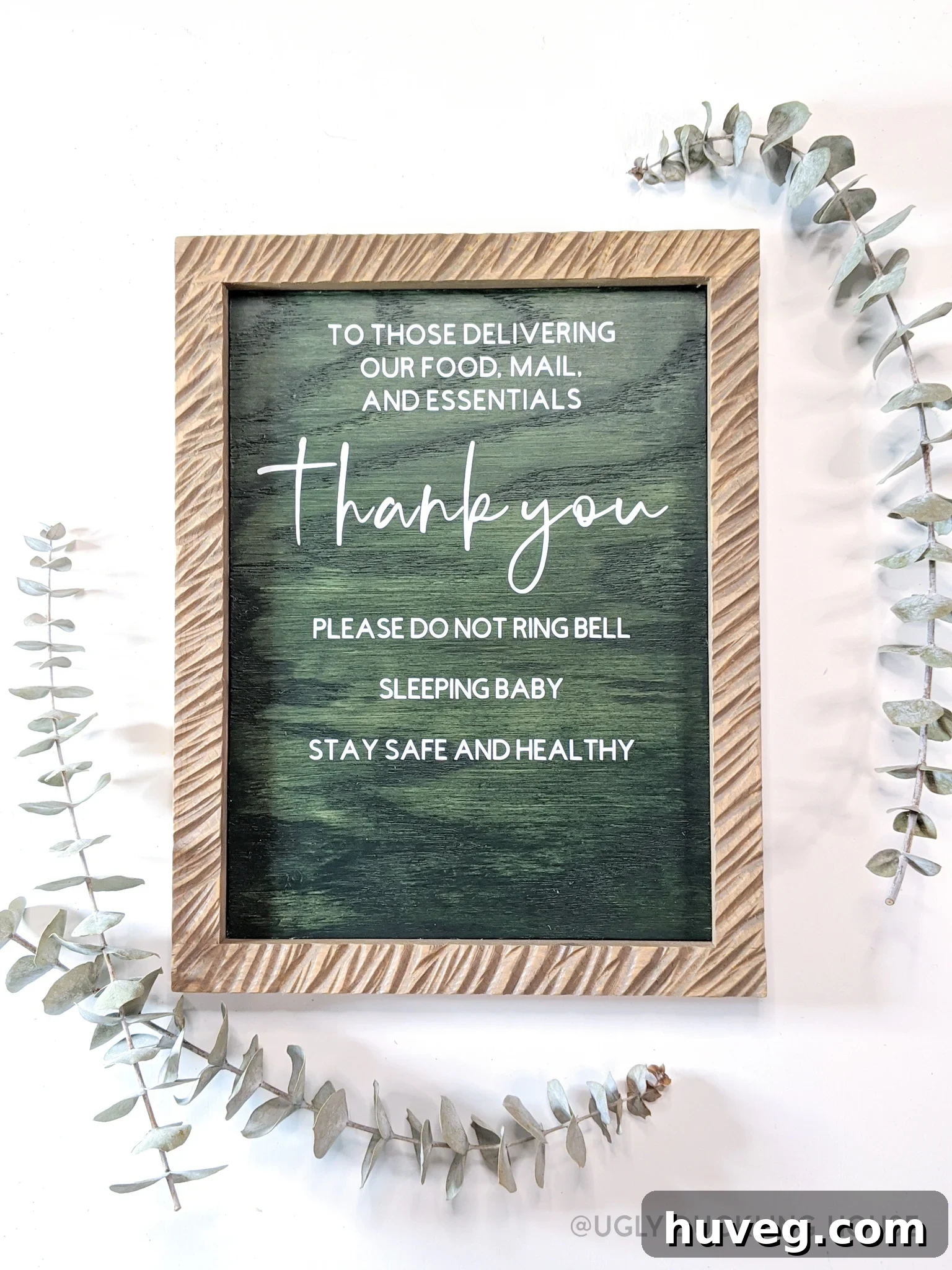
In our modern world, where convenience and safety often dictate our daily routines, delivery services have become more than just a luxury—they’re an absolute necessity. Whether it’s groceries, packages, or takeout, the rhythm of parcels arriving at our doorsteps is a constant hum. For many, this has meant staying out of crowded stores, a practice that’s particularly vital for individuals with compromised immune systems or those caring for vulnerable family members. My husband, K, and I both fall into the immunocompromised category, and the recent arrival of our precious son, Ellis, brought with it the profound responsibility of protecting a delicate newborn. This unique combination of frequent deliveries and heightened sensitivity to external disturbances sparked an idea, leading to this incredibly simple yet impactful Cricut project. And for those new to crafting with vinyl, don’t worry—I’ll share some invaluable tips on cutting and transferring even the tiniest letters. Trust me, if I could tackle this as a very first project, you absolutely can too!
A little personal anecdote: I actually conceptualized and completed this project in eager anticipation of Ellis’s arrival, preparing for our new chapter as parents. However, our little man had other plans and decided to make his grand debut earlier than expected! Instead of rewriting the entire post, I decided to keep it as it was originally drafted, a small nod to the sweet chaos and excitement of those expectant days. I hope this touch of nostalgia resonates with you as you read.
Have you ever found yourself contemplating the distinction between “Now You” and “Future You”? It’s a mental exercise I often engage in, particularly when mapping out upcoming projects or preparing for significant life changes. With our November due date looming closer at the time of this project’s conception, my thoughts frequently drifted to “Future Me” – that version of myself navigating the complexities of motherhood with a newborn, likely operating on minimal sleep and a delightful “fuzzy brain.” What essential tools, strategies, or comforting gestures would Future Me require to smoothly transition through the demanding newborn phase? What proactive steps could I take today to enhance those late-night feedings, or to secure a few more precious moments of uninterrupted sleep? The list felt overwhelmingly long, but I was determined to chip away at it, one small, manageable task at a time.
Often, it’s the seemingly minor adjustments that yield the most profound impact, and this DIY project emerged from precisely that realization. I’m intimately familiar with the common “baby sleeping, please don’t ring the doorbell!” signs that adorn many friends’ homes and populate countless Etsy shops. There is
For a visual guide to this project, simply follow along with the detailed DIY video below:
Here’s the honest truth: I had harbored a desire for a Cricut machine ever
Discover the Power of the Cricut Maker: Your Ultimate Crafting Companion
This sponsored post was crafted by me on behalf of Cricut. Rest assured, all opinions expressed here are 100% my own and reflect my genuine experience with the product.
When it came to selecting the perfect cutting machine for my diverse creative needs, the Cricut Maker emerged as the clear frontrunner. I already had a mental catalog brimming with future project ideas, and I knew I needed a machine capable of tackling an extensive variety of materials with precision and ease. This remarkable machine boasts the ability to cut over 300 different materials, including surprisingly robust options like thin pieces of
- Unleash your creativity with its multi-functional capabilities: cut, draw, score, deboss, engrave, and even create sophisticated perforations and elegant wavy lines.
- Command over 300 diverse materials, ranging from delicate foil and sturdy duct tape to luxurious linen and various fabrics, supple leather, versatile vinyl, robust cardstock, and even basswood.
- Benefit from the intuitive and user-friendly Cricut Design Space software, accessible seamlessly across both desktop and mobile devices, ensuring you can design and create anytime, anywhere.
- Beyond its technical prowess, owning the Cricut Maker and its suite of accessories simply brings a consistent sense of joy and creative satisfaction every time I engage with it. 🙃
One of the most surprising and delightful discoveries during my initial experience with the Cricut Maker was just how exceptionally
Crafting Your Custom Front Door Sign: “Thank You, But Please Don’t Ring the Doorbell!”
This comprehensive guide will walk you through the process of creating a charming and functional front door sign. Perfect for new parents, remote workers, or anyone who frequently receives deliveries, this sign offers a polite request for quiet while simultaneously expressing gratitude to your hardworking delivery personnel. Let’s gather our tools and materials and bring this thoughtful DIY project to life.
Essential Materials & Tools for Your Project
- Cricut Maker Machine
- Cricut Premium Vinyl Starter Kit (includes vinyl sheets, transfer tape, and weeding tools)
- Cricut Basic Tools Set (for weeding, scraping, and other essential tasks)
- Pencil
- Miter Saw (for precise wood cuts)
- Measuring Tape
- Comprehensive safety gear: Safety Glasses, Hearing Protection, and a Breathing Mask (especially when cutting or sanding wood)
- Angle Grinder (optional, for decorative frame carving)
- Sanding Disc Attachment (for angle grinder)
- Wooden dowels or suitable trim (for crafting the sign’s frame)
- Scrap wood or plywood (for the main sign backer)
- Wood stain or paint (your choice for color and finish)
- Wood Glue (strong adhesive for assembly)
- Pin Nailer (for secure frame attachment)
- Polycrylic Protective Finish (for weather resistance)
Time needed: 2 hours
Create a charming and effective front door sign to kindly thank your delivery drivers and respectfully request they avoid ringing the doorbell, ensuring peace and quiet at your home.
- Seamlessly Set Up Your Cricut Machine
The beauty of the Cricut Maker lies in its user-friendly design. Upon unboxing, you’ll find a small envelope containing everything necessary for a smooth setup and your very first test cuts. This includes clear instructions and materials to install the Cricut Design Space software and complete a sample project. Follow these prompts carefully; the guided process will have your machine fully operational in no time, building your confidence for the steps ahead. Within minutes, you’ll be ready to roll!
- Draft and Refine Your Sign’s Text in Design Space
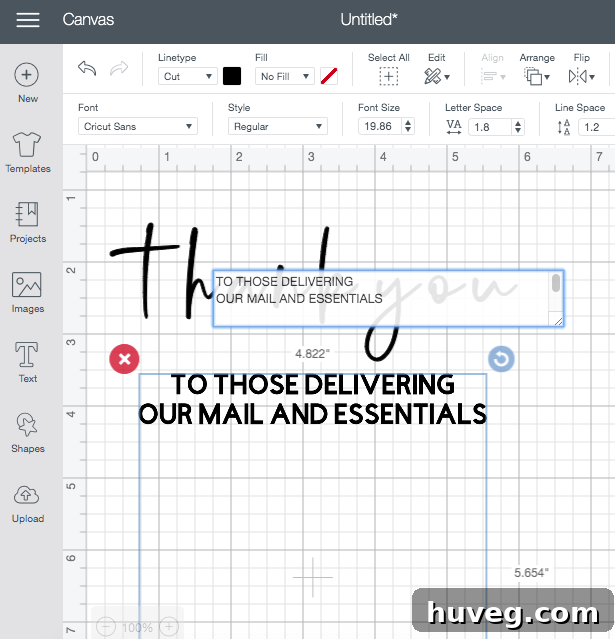
Begin by conceptualizing the message for your sign. I had a general vision for the size and style of my text, but the intuitive Cricut Design Space software makes it incredibly simple to experiment with various fonts, sizes, and layouts until you achieve the perfect look. You’re not limited to Cricut’s extensive font library; you can also seamlessly import and utilize all your personal fonts. Play around with different combinations to ensure readability and visual appeal. Consider the overall dimensions of your sign backer as you finalize your text design to ensure a balanced and aesthetically pleasing result. This digital drafting stage is crucial for precise cuts later on.

- Prepare the Vinyl Sheet and Execute Your First Precise Cut
Does anyone else take a deep breath before making that first critical cut on a new material? It’s a common moment of anticipation! Even though I had ample extra vinyl and had deliberately designed the project to use less than half a sheet, just in case a re-cut was necessary, those initial nerves are always present. To prepare, firmly attach your chosen vinyl (ensure it’s appropriate for outdoor use, like permanent vinyl) to the Cricut cutting mat, smoothing out any bubbles to ensure optimal adhesion. Select your material type in Design Space, load the mat into the machine, and press the ‘Go’ button. Witnessing the machine precisely cut your intricate design is incredibly satisfying. My first cut turned out absolutely perfectly, which was a huge relief and a testament to the Cricut’s accuracy!
- Expertly Cut and Stain Your Sign Board; Allow for Thorough Drying
First, using a miter saw and precise measurements, cut your scrap wood or plywood to the desired dimensions for your sign backer. Once cut, sand all edges and surfaces thoroughly to ensure a smooth, splinter-free finish. I’ve recently been enjoying experimenting with solid color stains, so for this sign, I impulsively opted for a rich, dark green for the backer. Of course, you have the creative freedom to choose any wood stain or paint color that complements your home’s aesthetic. Since this sign will be exposed to the elements (even on a covered porch, moisture and sunlight can take their toll over time), I strongly recommend applying several generous coats of polycrylic. This protective finish will shield the wood from weather damage and prolong the life of your sign. For optimal readability of your vinyl lettering, I advise choosing a matte or flat polycrylic finish, as a glossy sheen can sometimes create glare and make the text harder to discern.
- Craft and Fit a Decorative Frame Around Your Sign Backer
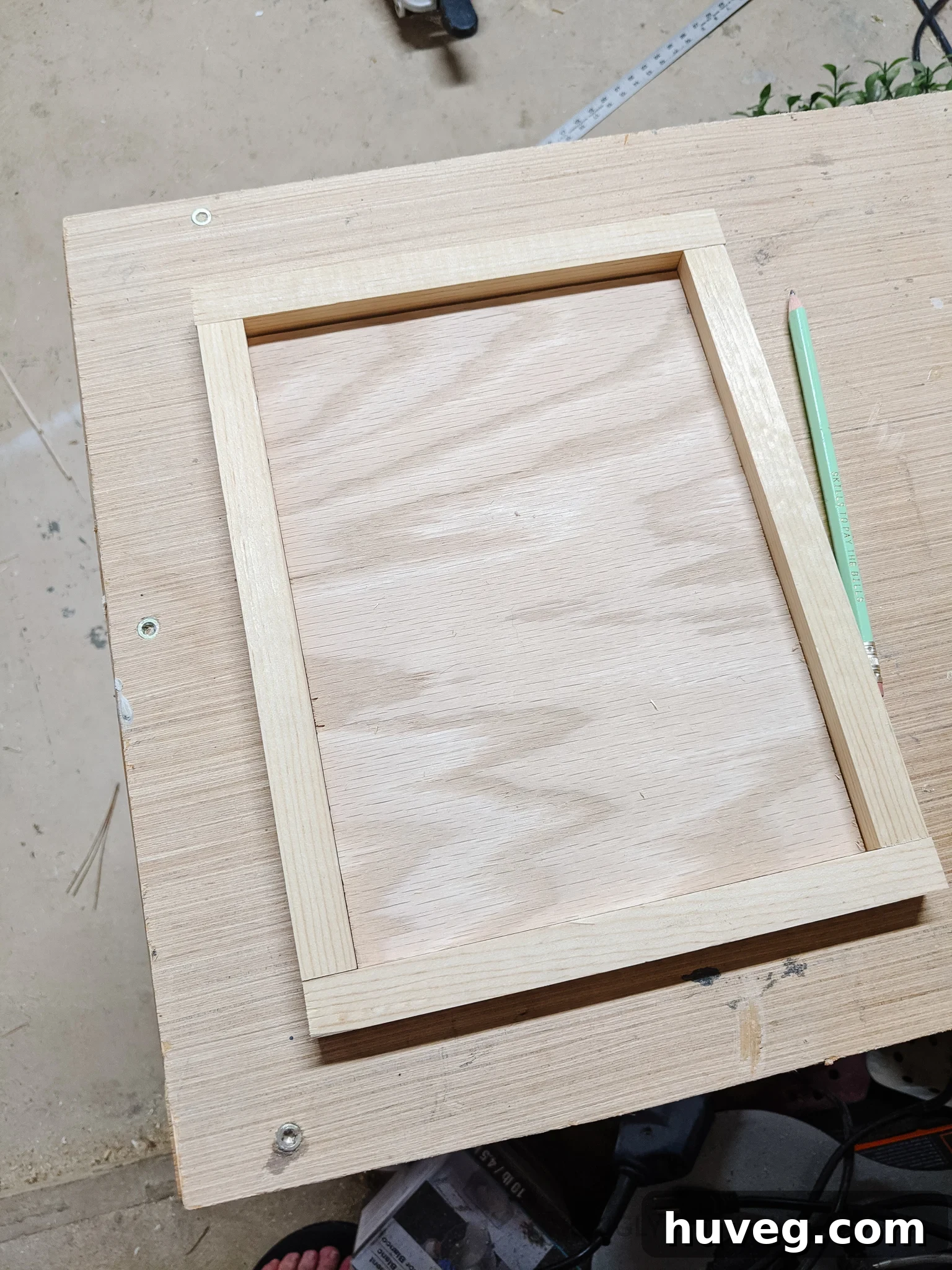
While rummaging through my garage, I rediscovered a few pieces of square wooden dowels – items I’d acquired for an unknown future project, but now perfect for this one! The beauty of DIY is repurposing. Carefully measure the perimeter of your stained sign backer. Using your miter saw, cut the dowels at 45-degree angles to create neat, flush corners that will frame your sign beautifully. Dry-fit the pieces around your backer to ensure a perfect fit before moving on. Initially, I thought this simple frame would suffice, but as I looked at it, I realized it needed a little something extra, a touch of unique character to elevate its design.
- Optional Enhancement: Artfully Carve the Frame for Added Texture
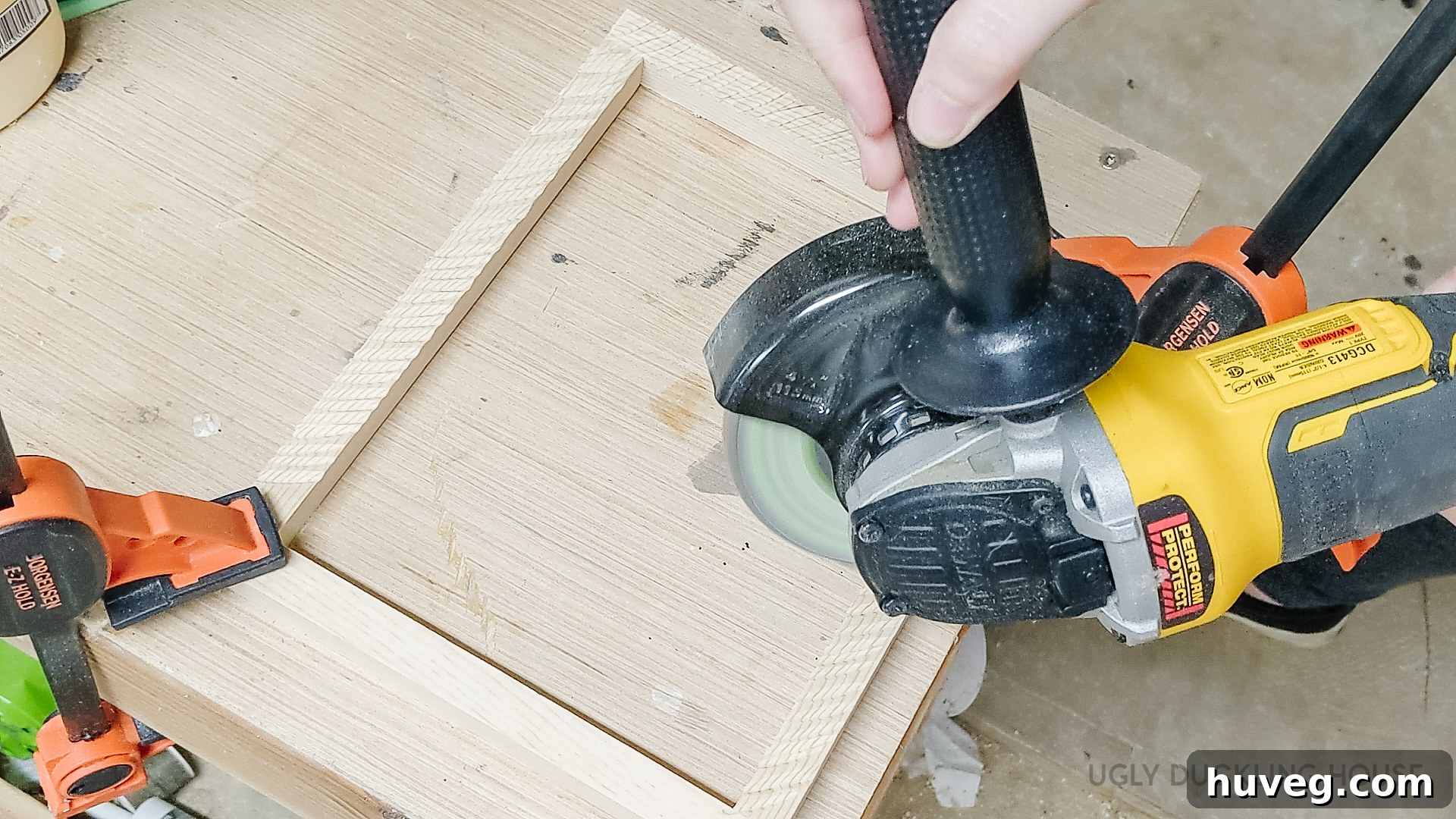
It’s no secret among my readers: I absolutely adore wood carving! It’s one of my go-to techniques for instantly infusing texture, depth, and significant visual interest into virtually any project that feels a bit plain. For this frame, I utilized an angle grinder fitted with a sanding disc to create quick, deliberate marks across the entire surface of the wooden dowels (you can observe this technique clearly in the accompanying video). These seemingly random yet intentional gouges create a beautiful, rustic texture. After carving, I applied a matching stain, which seeped into the newly created grooves, further emphasizing the textured effect and adding a rich, aged character to the frame. This step, while optional, truly elevates the sign from simple to custom.
- Securely Attach the Backer to the Newly Carved Frame
To be completely transparent, I didn’t fully plan out this attachment step in advance. In an ideal scenario (and with the benefit of hindsight!), I would have routed a small, shallow groove into the back edge of the frame. This would allow the sign backer to neatly nestle inside, creating a seamless joint for gluing and pin nailing. This is definitely the method I’d recommend you adopt if you have the tools! However, since I hadn’t done that, I improvised by using several small, thin scrap pieces of wood. I glued these strategically across the back of the joint between the frame and the backer, effectively fusing the two components together. Think of it like applying tape across a seam – it provides reinforcement and stability. Apply wood glue to all contact points and use a pin nailer to secure the pieces, ensuring a durable and lasting bond.
- Meticulously Peel Off Excess Vinyl (Weeding)
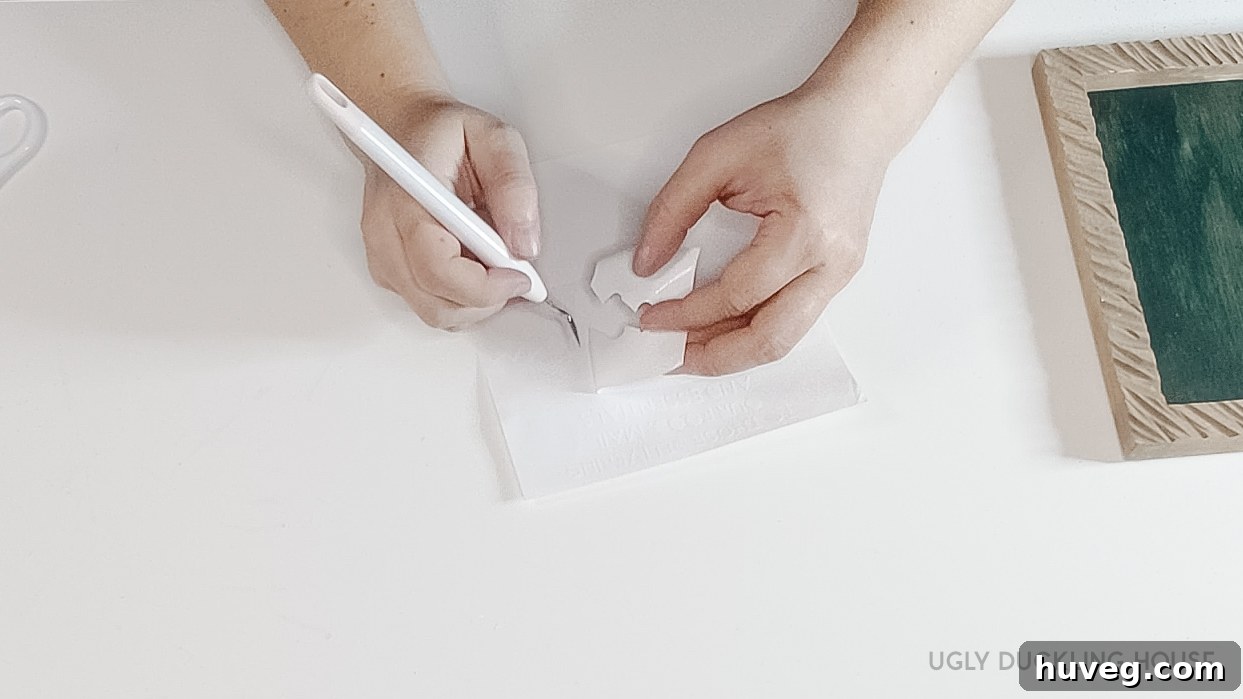
At this stage, your beautifully crafted frame is ready, and your vinyl design has been precisely cut by the Cricut. Now comes the crucial weeding process – removing all the unwanted vinyl around and within your lettering. I utilized a specialized tool included in my Cricut Basic Tools Kit; it closely resembles a dental pick, with a fine, sharp point perfect for intricate work. Patience is key here, especially when dealing with super small letters. Carefully use the weeding tool to lift and peel away every piece of vinyl that isn’t part of your final design, leaving only the desired text and graphics on the liner. This step ensures a clean, professional look for your sign.
- Flawlessly Transfer Vinyl Letters to the Sign Backer
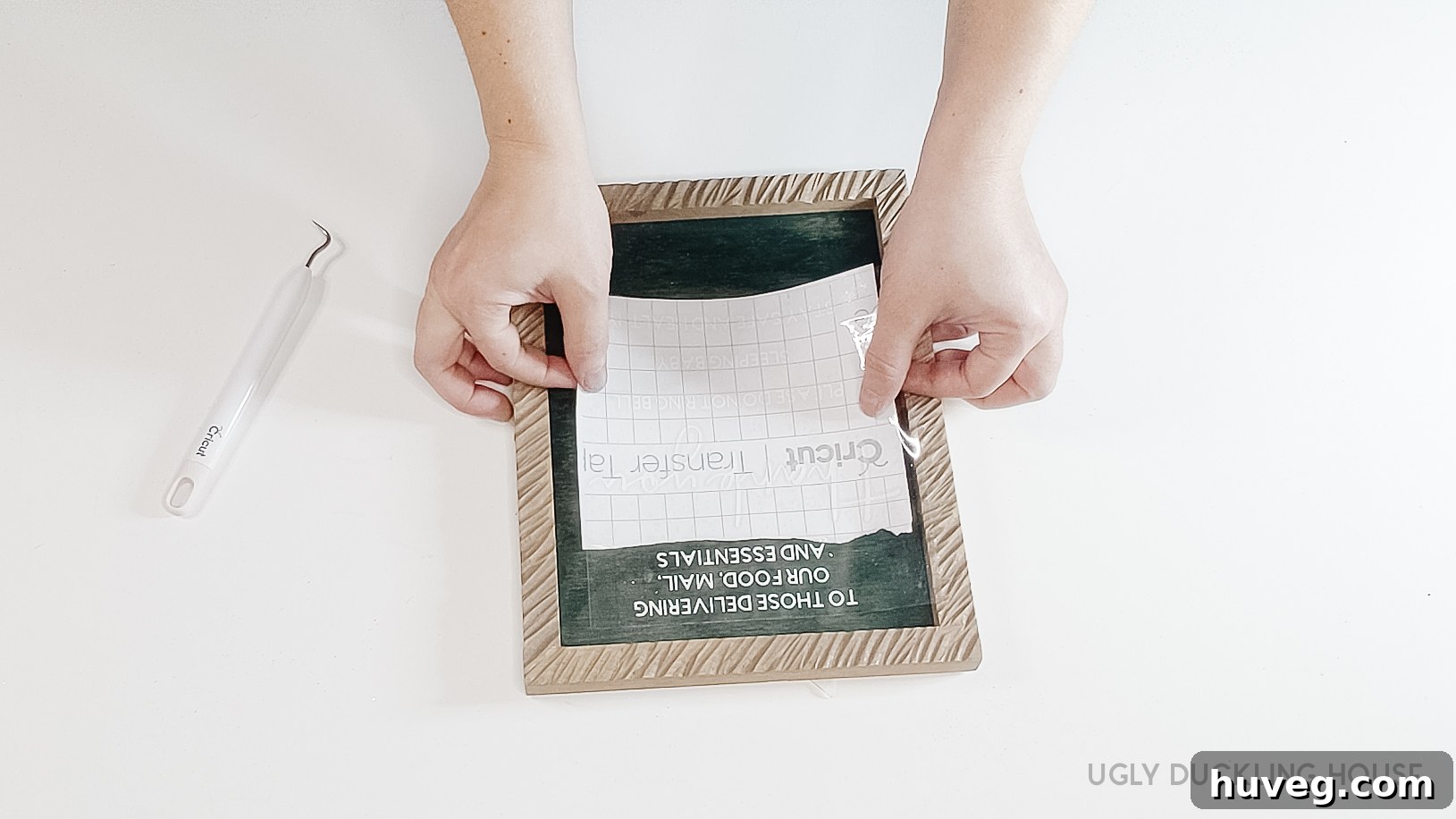
Initially, I felt a slight intimidation at the prospect of transferring the small, delicate lettering onto the sign, but I quickly discovered it was surprisingly straightforward! Begin by cutting a piece of Cricut transfer tape to a size slightly larger than your weeded vinyl design. Carefully lay the transfer tape over your vinyl, smoothing it out with a scraper tool (part of the Basic Tools Kit) to ensure strong adhesion between the tape and the vinyl letters. Next, slowly peel the paper backing off the vinyl, ensuring all your letters adhere to the transfer tape. With the vinyl now on the transfer tape, carefully align it on your sign backer, paying close attention to centering and positioning. Start by pressing down one edge, then slowly smooth the tape across the sign, using your scraper tool to firmly adhere the vinyl to the wood. Once satisfied, slowly peel off the transfer tape at a sharp angle, making sure every letter has successfully transferred. If any part resists, simply press the transfer tape back down and rub firmly before trying again. For a complete visual demonstration, refer to the project video!
- Display Your Thoughtful New Sign
Congratulations! Your custom “Thank You, But Please Don’t Ring the Doorbell!” sign is now complete. Choose a prominent and easily visible spot near your front door – perhaps hanging it from a small hook or securing it with command strips – where delivery drivers can clearly see your thoughtful message. Step back and admire your handiwork, knowing you’ve created a beautiful and functional piece that brings both peace to your home and appreciation to those who deliver to it.
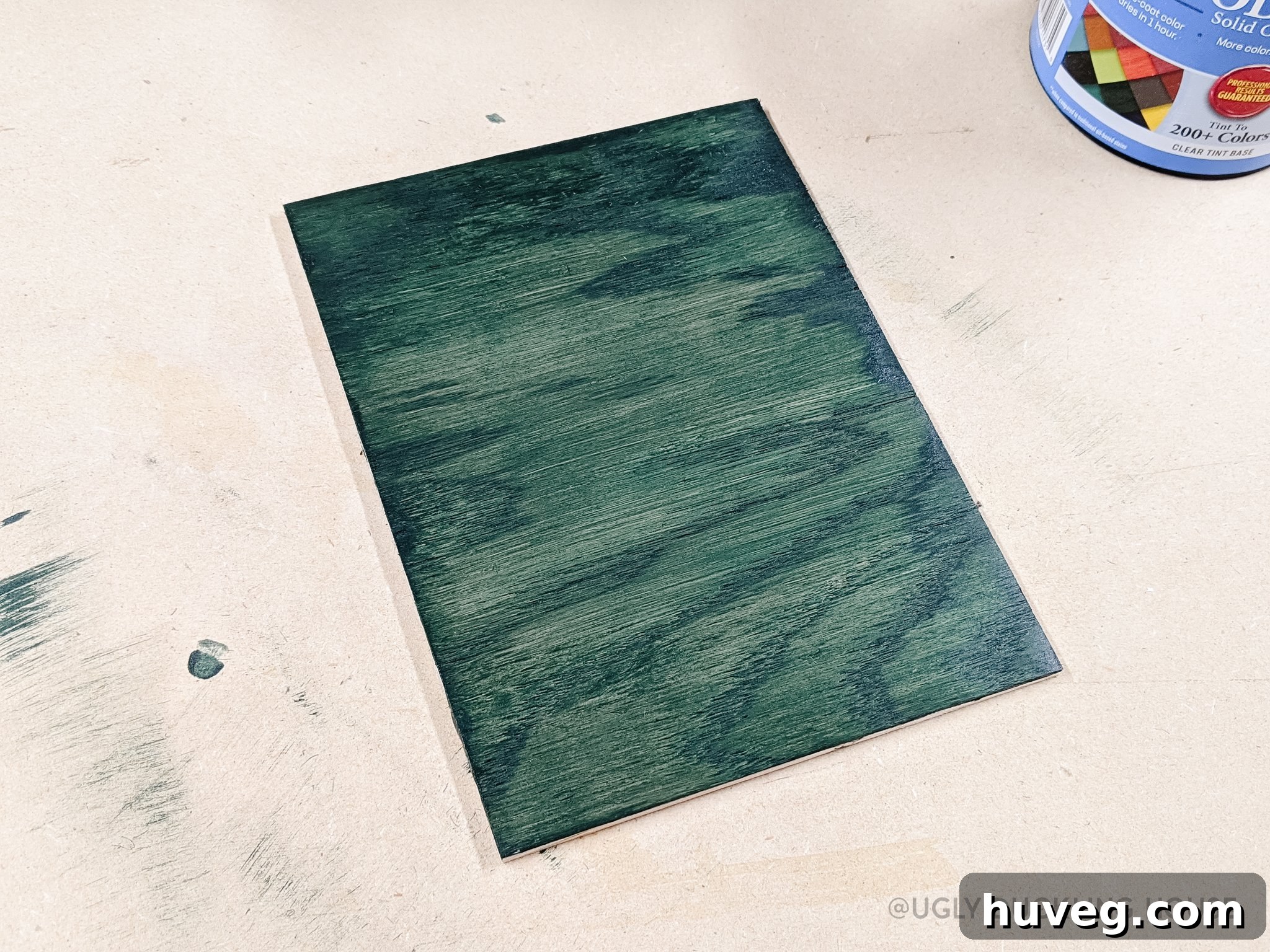
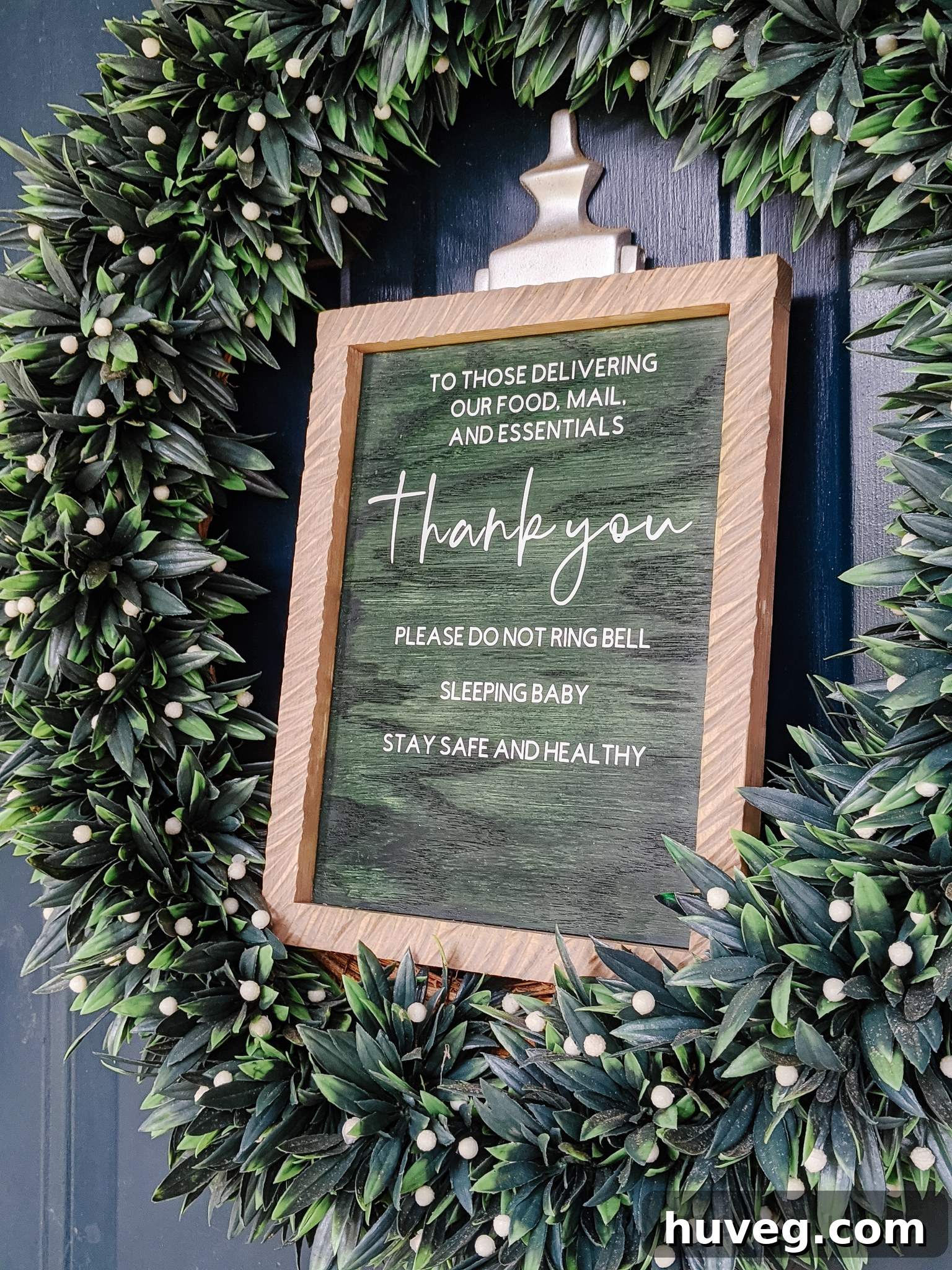
I am genuinely thrilled with how the dark green stain turned out on this project. It offers a sophisticated, understated elegance that I find quite appealing. My choice of this particular color wasn’t arbitrary, however; it’s actually a sneak peek into future plans! Spoiler alert: I’m planning to change the color of our front door very soon, and this green was selected to perfectly complement that upcoming transformation. While I love the stain, I also believe that a vibrant paint color would look absolutely fantastic for the backer, offering another wonderful avenue for personalization.
Currently, I’m still in the process of learning how to efficiently convert this design into a downloadable file format that is directly compatible with Cricut Design Space. My goal is to make it incredibly easy for you to recreate this exact sign for your own home. Rest assured, I am actively working on making a free downloadable file available to you as soon as possible! Once finalized, it will be added to my exclusive printables library, so keep an eye out there. Until then, be sure to pin the image below to your favorite DIY or home decor boards for future inspiration and easy access!
Don’t forget to pin this thoughtful DIY project for later and share it with friends and family who could benefit from a little more peace and quiet!